September 15, 2026·9 min read
Table Header Accessibility: The WCAG Rule Most Sites Miss
A data table without real header markup reads to screen readers as meaningless numbers. See the WCAG 1.3.1 fix and what Axeazy can and can't auto-fix.
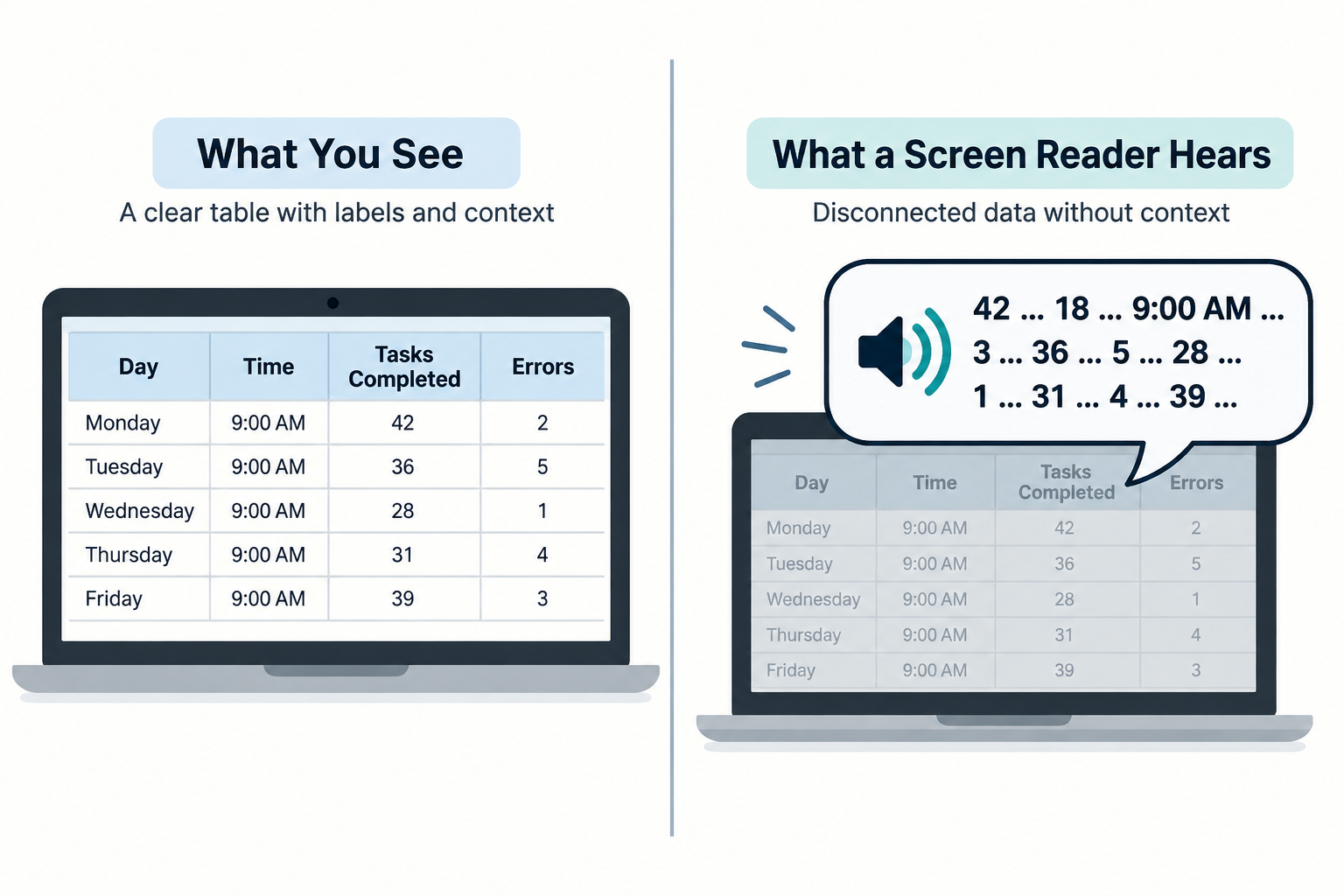
A data table without real header markup reads to a screen reader as a stream of bare numbers, with no idea which row or column any of them belong to. Fixing it means using <th> instead of <td> for header cells and adding a scope attribute, which satisfies WCAG 1.3.1 (Info and Relationships) and turns a table from a visual layout into something a screen reader can actually navigate.
Key Takeaways
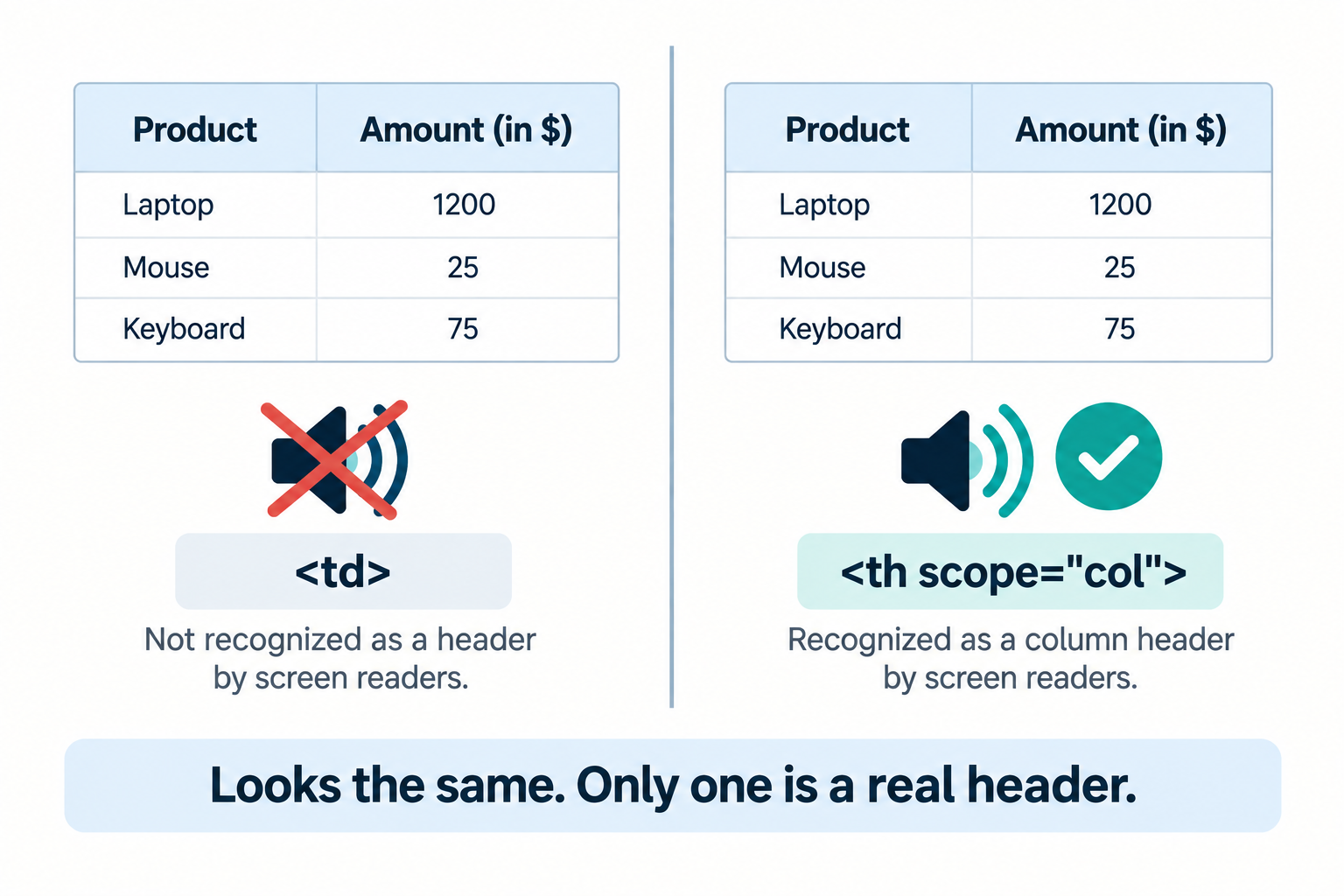
<th>and<td>look identical if you style them the same way, but only<th>tells a screen reader "this is a header." Bold, centered text in a<td>is invisible to assistive technology as a header, no matter how it looks.- The
scopeattribute tells a screen reader which direction a header applies in. Valid values arecol,row,colgroup, androwgroup, nothing else. - This is a WCAG 1.3.1 (Info and Relationships) requirement, Level A. It also maps to Section 508's 1194.22(g) and EN 301 549's 9.1.3.1, so it isn't a US-only rule.
- axe-core scans for seven distinct table problems, and only one of them, a mistyped
scopevalue, has any automatic fix today. The rest need a person who understands what the table actually means. - Simple tables (headers only in the first row or first column) need less markup than most guides imply. Plain
<th>elements are enough there;scopebecomes necessary once a table has headers in more than one direction.
Why <th> vs. <td> Is the Whole Ballgame
A sighted visitor reads a table by scanning across a row and up to a column heading, without thinking about it. A screen reader has no equivalent way to "glance up." It reads cell by cell, and the only way it knows a cell is a header, rather than just another piece of data, is the underlying HTML element.
<th> is a header cell. Browsers bold and center it by default, and screen readers announce it as a header when a user navigates the table. <td> is a plain data cell. It carries no such announcement, no matter what CSS is applied to it.
This is where almost every real-world table breaks. A developer builds a table, wants the header row to look bold, and reaches for <td style="font-weight: bold"> instead of <th>. Visually, it's indistinguishable from a real header. To a screen reader, it's just another data cell that happens to be bold, with zero relationship to the cells below it.
<!-- Fails: looks like a header row, announces as plain data -->
<table>
  <tr>
    <td><strong>Day</strong></td>
    <td><strong>Open</strong></td>
    <td><strong>Close</strong></td>
  </tr>
  <tr>
    <td>Monday</td>
    <td>9:00 AM</td>
    <td>6:00 PM</td>
  </tr>
</table>

<!-- Passes: real header cells, announced as headers, plus a caption -->
<table>
  <caption>Store hours</caption>
  <tr>
    <th scope="col">Day</th>
    <th scope="col">Open</th>
    <th scope="col">Close</th>
  </tr>
  <tr>
    <td>Monday</td>
    <td>9:00 AM</td>
    <td>6:00 PM</td>
  </tr>
</table>
Both render identically for a sighted visitor. Only the second one tells a screen reader user that "9:00 AM" belongs to "Open" on "Monday."
The scope Attribute, and When You Actually Need It
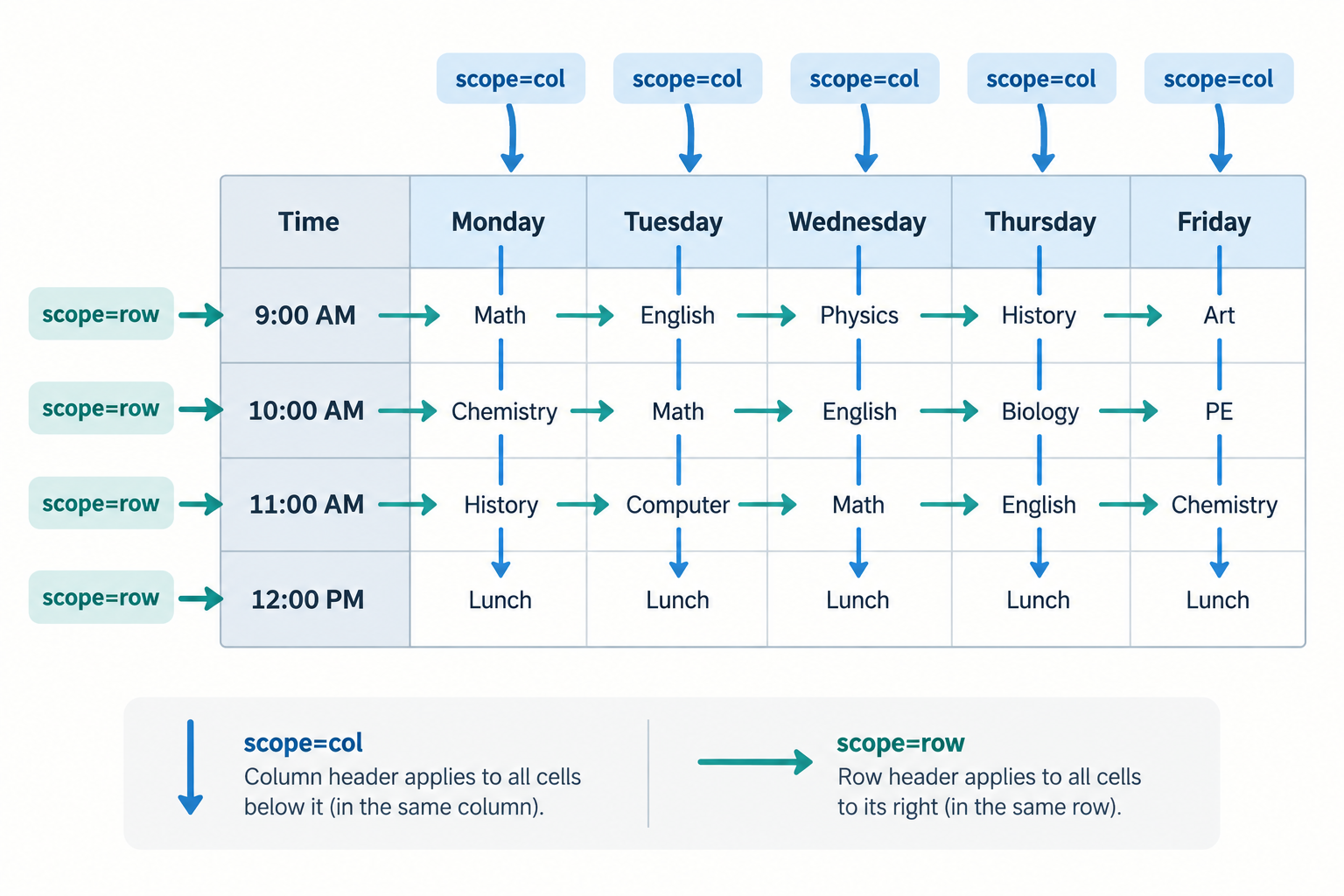
For a simple table, one that has headers only in the first row, or only in the first column, not both, <th> alone is enough. A screen reader can correctly infer the direction. This is a case where the strict WCAG requirement is genuinely lighter than a lot of accessibility content implies.
Once a table has headers running in two directions at once, a schedule with days across the top and time slots down the side, for example, scope stops being optional in practice. Without it, a screen reader has no reliable way to know whether a given <th> labels the row or the column it sits in.
<table>
  <caption>Weekly class schedule</caption>
  <tr>
    <th scope="col"></th>
    <th scope="col">Monday</th>
    <th scope="col">Wednesday</th>
  </tr>
  <tr>
    <th scope="row">9:00 AM</th>
    <td>Yoga</td>
    <td>Pilates</td>
  </tr>
  <tr>
    <th scope="row">6:00 PM</th>
    <td>Spin</td>
    <td>Yoga</td>
  </tr>
</table>
Here, scope="col" marks the day headers and scope="row" marks the time headers. A screen reader user landing on the "Pilates" cell hears both: Wednesday, 9:00 AM, Pilates.
For a genuinely irregular table, merged cells, headers that don't sit cleanly in one row or column, scope isn't enough on its own. That's what the headers and id attributes are for: each data cell explicitly lists the ids of every header cell that applies to it.
<th id="q3">Q3</th>
...
<td headers="q3">42</td>
This is more work to write and to maintain, which is exactly why it's reserved for tables scope genuinely can't describe, not used as a default.
What axe-core Actually Checks in a Table
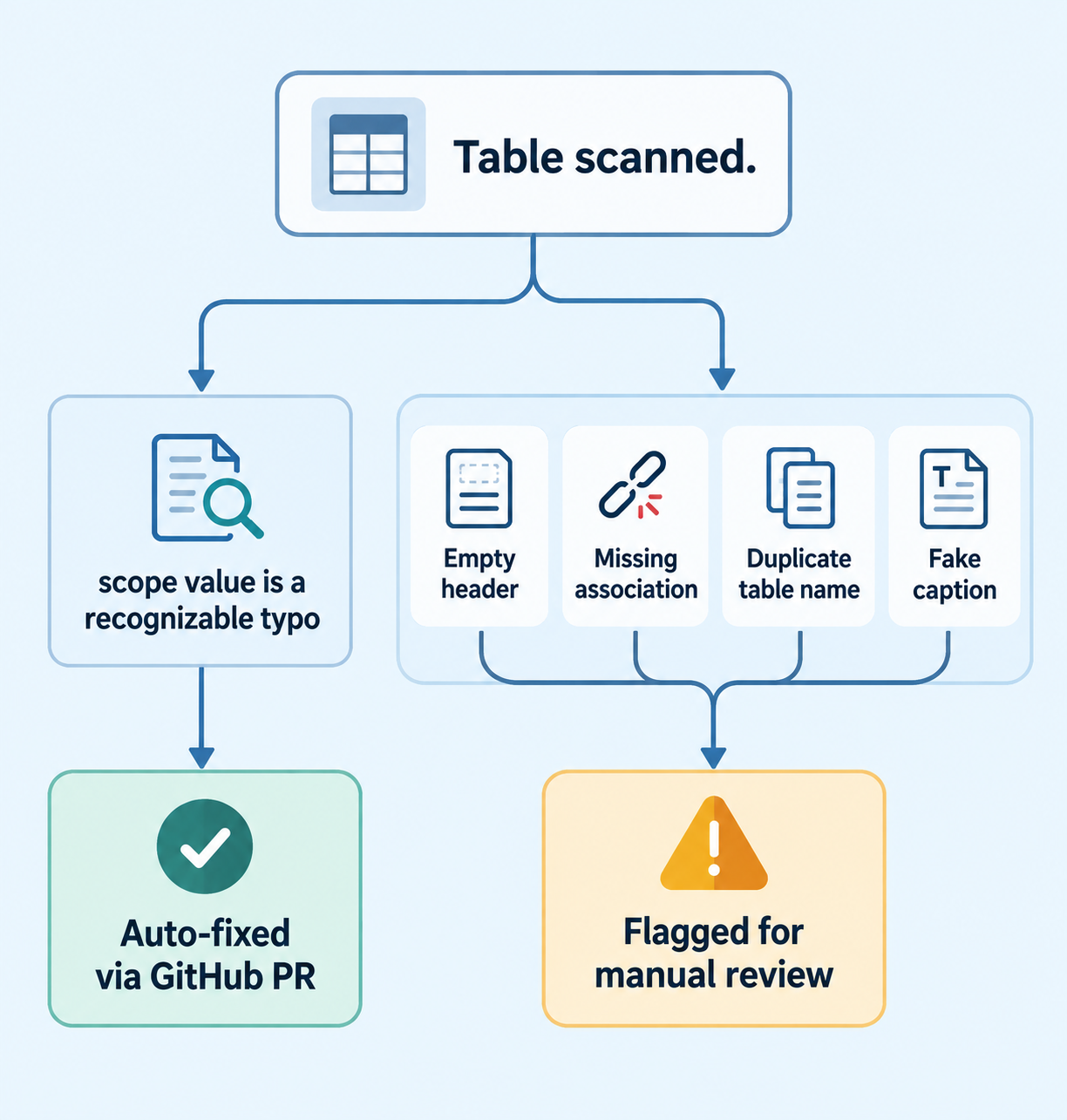
axe-core, the same engine behind Chrome DevTools' accessibility panel and Axeazy's scanner, runs seven separate checks against table markup. Only one of them has an automatic fix today.
| Rule | What it checks | Fix path |
|---|---|---|
scope-attr-valid |
The scope value isn't a real word, a typo or plural of col/row/colgroup/rowgroup |
Auto-fixed via GitHub pull request, narrow: only recognizable typos |
empty-table-header |
A <th> exists but has no text inside it |
Manual |
th-has-data-cells |
A <th> exists but no data cell actually uses it |
Manual |
td-has-header |
A data cell has no header associated with it at all | Manual |
td-headers-attr |
A headers attribute points to an id that isn't an actual header cell |
Manual |
table-duplicate-name |
Two tables on the same page share the same accessible name | Manual |
table-fake-caption |
Text styled to look like a caption instead of a real <caption> element |
Manual |
That table makes the honest picture obvious. Table structure is overwhelmingly a manual-fix category. The only piece written automatically is correcting a scope value that's already there but misspelled, something like "cols" or "ROW " getting normalized to "col" or "row". Adding a missing header, writing a caption, or working out which headers id belongs on which cell all require understanding what the table actually means, and that's still a person's job.
How to Check Your Own Tables
You don't need a screen reader installed to catch the most common version of this mistake.
- View the page source. Right-click any table on your site and choose View Page Source, or open DevTools and look at the Elements panel. Search for
<th. If the header-looking row is made of<td>elements instead, that table fails. - Check for a
scopevalue on multi-directional tables. If a table has headers running both across the top and down the side, confirm each<th>carriesscope="col"orscope="row", not just bold styling. - Listen to it. In NVDA, moving through a properly marked-up table with table navigation (
Ctrl+Alt+Arrow keys) announces the relevant header alongside each cell's value. If you only hear raw numbers with no header spoken first, the table isn't properly associated. - Or run a scan instead of checking table by table. Axeazy's free scan checks every table on your homepage against all seven rules above in about 60 seconds, alongside the other fix categories it covers.
Common Mistakes
- Bold
<td>cells standing in for<th>. The single most common failure, and the hardest to catch by eye, since it looks completely correct. - A caption that's just a bolded line of text above the table, instead of a real
<caption>element. Sighted visitors can't tell the difference; a screen reader can. - Multiple tables on one page with no distinguishing caption, so a screen reader user can't tell which table is which when jumping between them.
- Using a table purely for visual layout, not tabular data. A screen reader still tries to announce row and column relationships that were never meant to exist, which is more confusing than no structure at all. Modern CSS (Grid or Flexbox) handles layout without this side effect.
- Reaching for
scopewhen a table actually needsheaders/id.scopeonly describes a simple row-or-column relationship. A table with merged cells or headers that don't sit cleanly in one row or column needs the more explicitheaders/idpairing instead.
What Axeazy Can Fix Here
This category is more honest to talk about than most, because the automatic part of it is genuinely small.
Axeazy's scan flags all seven table rules above the moment it finds them, the same detection whether that's Axeazy, Chrome DevTools, or any other tool built on axe-core. Writing the fix is where it gets manual. The only table-related fix that reaches a real GitHub pull request today is correcting an already-present scope value that's a recognizable typo or plural, nothing else in this category has an automated path yet.
There's also no WordPress plugin path for table fixes at all right now. The free plugin's three instant fixes cover skip navigation, the language attribute, and alt-text fallback, none of which touch table markup, and paid tiers don't extend to table structure either today.
That's not a gap someone forgot about. Deciding whether a <td> should have been a <th>, or which header an irregular cell actually belongs to, requires understanding what the table is trying to communicate. A script guessing wrong here would silently misrepresent the data to exactly the people relying on the markup to understand it, which is worse than leaving it flagged for a person to fix correctly. See the full fix-category breakdown.
FAQ
Do I need a scope attribute on every single header cell?
No. For a simple table with headers only in the first row or only in the first column, plain <th> elements are enough on their own. scope becomes necessary once a table has headers running in two directions at once, such as a schedule with days across the top and times down the side.
What's the difference between scope and headers/id?
scope describes a simple, one-directional relationship, a header applying to an entire row, column, or group of rows or columns. headers/id is more explicit: each data cell lists exactly which header cells apply to it by id. Use scope for regular grid-shaped tables and headers/id only for irregular tables with merged cells or headers that don't sit cleanly in one row or column.
Does Axeazy auto-fix missing table headers?
Mostly no, and it's worth being direct about that. The only table-related fix with a working automatic path today is correcting a scope value that's already present but misspelled. Adding a missing header, writing a real caption, or mapping headers to the right id all require understanding what the table means, so those stay manual review items.
Do I need a caption on every table?
It isn't a strict WCAG 1.3.1 requirement on its own, but it's genuinely useful, especially once a page has more than one table. A caption gives a table its accessible name, so a screen reader user jumping between tables can tell which one they've landed on.
What about tables used for page layout instead of data?
Avoid it where possible. A screen reader still tries to announce row and column relationships on a layout table, which creates confusion that wouldn't exist with plain CSS layout instead. If a legacy layout table can't be removed right away, marking it with role="presentation" tells assistive technology to skip the table semantics entirely.
Sources
Want this in your inbox?
The ADA Alert. Weekly intelligence.
Every Tuesday: accessibility news, common WCAG issues, and code-level fixes. Free. Unsubscribe in one click.
Scope of every report we ship: SCOPE LIMITATION: This report documents violations identified by automated WCAG 2.2 AA scanning using axe-core v4.11.0. Automated tools cannot test every WCAG criterion; many criteria require manual review. This report does not constitute legal advice, guarantee ADA compliance, or protect against legal action. ADA compliance is a legal determination made by courts. For full WCAG conformance assessment, engage an IAAP-certified accessibility professional.