September 18, 2026·8 min read
Keyboard Tab Order: Test and Fix It Without a Developer
A broken tab order silently blocks keyboard and screen reader users. Here's how to test yours with just the Tab key, no developer needed.
A broken tab order doesn't just look messy, it can block someone from using your site at all. Pressing Tab should move focus through every interactive element in a sensible order, and anything focus never reaches simply can't be activated by a keyboard-only user. You can test your own site for this in about 60 seconds with nothing but the Tab key.
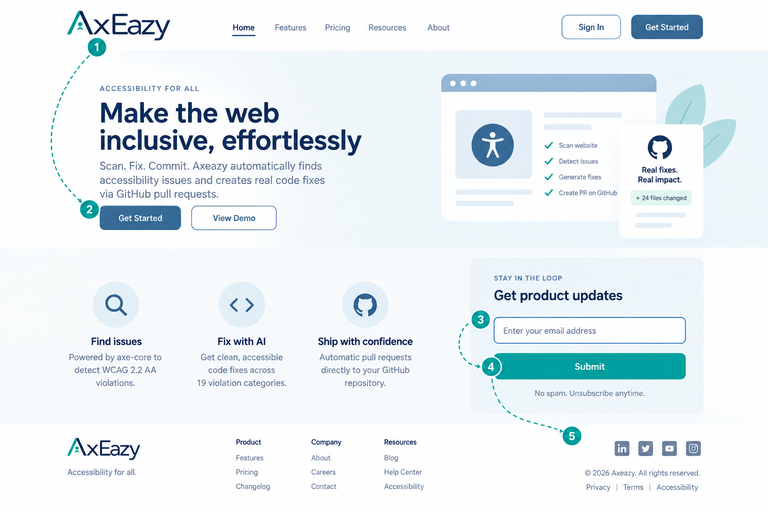
Key Takeaways
- Tab order is the sequence focus moves through when someone presses the Tab key, with no mouse involved. Shift+Tab moves backward through the same sequence.
- This isn't a niche concern. Anyone who can't reliably use a mouse, due to a tremor, paralysis, a repetitive strain injury, or a temporary injury, relies entirely on keyboard navigation to use a website.
- There are two distinct failure modes, and one is far worse than the other. A confusing order is annoying. An interactive element that Tab never reaches at all is a hard block, not a usability complaint.
- You can test this yourself, right now, with no developer and no special tools. Click the address bar, then press Tab repeatedly and watch where focus goes.
- axe-core auto-fixes one specific version of this problem with high confidence, a positive
tabindexvalue, and flags a few related issues that genuinely need a person to judge, because judging whether an order "makes sense" requires understanding the page.
What Tab Order Actually Is
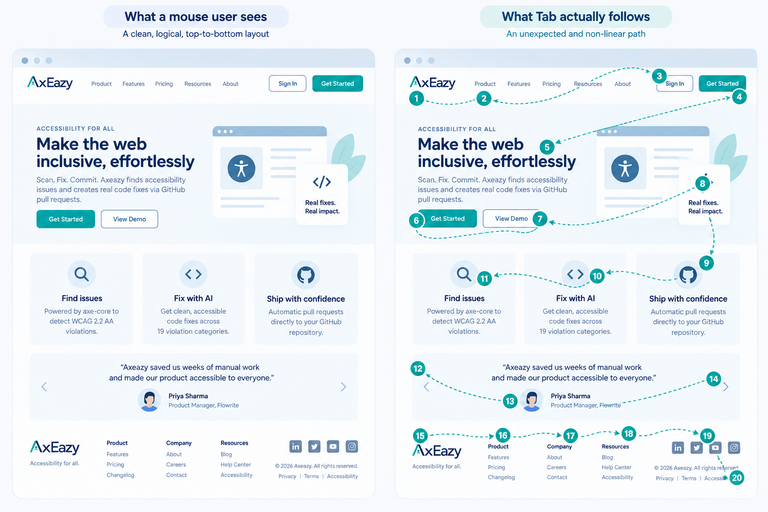
Pressing Tab moves keyboard focus to the next interactive element on the page, links, buttons, form fields, anything a user can act on. Shift+Tab moves backward. By default, that sequence follows the order elements appear in the underlying HTML, which is usually the same order a sighted user would encounter them reading top to bottom.
A visible focus indicator, typically an outline around whatever currently has focus, shows a keyboard user where they are. Without it, or without a sensible order behind it, keyboard navigation stops being usable, even though nothing looks broken to someone using a mouse.
Why This Matters
Someone who can't use a mouse, because of a tremor, paralysis, a missing limb, Parkinson's, ALS, or something as ordinary as a broken wrist, still needs to check out, fill out a form, and navigate a menu. The keyboard is how they do all of it. Screen reader users also tab through interactive elements as one of several ways they move through a page, so this overlaps with, but isn't identical to, screen reader accessibility.
A confusing tab order is a real usability problem, focus jumping from a header link straight to a footer button, skipping the entire middle of the page, forces someone to guess and backtrack. But it's still navigable, eventually. An interactive element that focus never reaches at all is different in kind, not degree: a button a keyboard user literally cannot tab to is a button they cannot press, full stop, no workaround available to them from the keyboard alone.
The 60-Second Tab Key Test
- Click somewhere neutral first, like the browser's address bar, so you're starting from a known position rather than wherever focus happened to land.
- Press Tab repeatedly and watch the visible outline move through the page. Does it move in a sequence that roughly matches what you'd see scanning the page visually, top to bottom, left to right?
- Try to activate what you land on. Press Enter on a link or button, Space to toggle a checkbox. Does it actually work from the keyboard, not just visually receive focus?
- Check that every interactive thing gets a turn. Menu items, form fields, buttons, custom widgets like a date picker or an accordion, all of them should be reachable this way.
- Watch for a trap. If Tab or Shift+Tab ever gets stuck and won't move you off an element, that's a more severe issue than order alone, a keyboard trap under WCAG 2.1.2, and it needs fixing immediately.
- Confirm you can actually see where you are. If focus moves but no visible outline shows where, that's a separate but related failure, WCAG 2.4.7 Focus Visible, worth noting even though it's not the main subject here.
What a Broken Tab Order Actually Looks Like
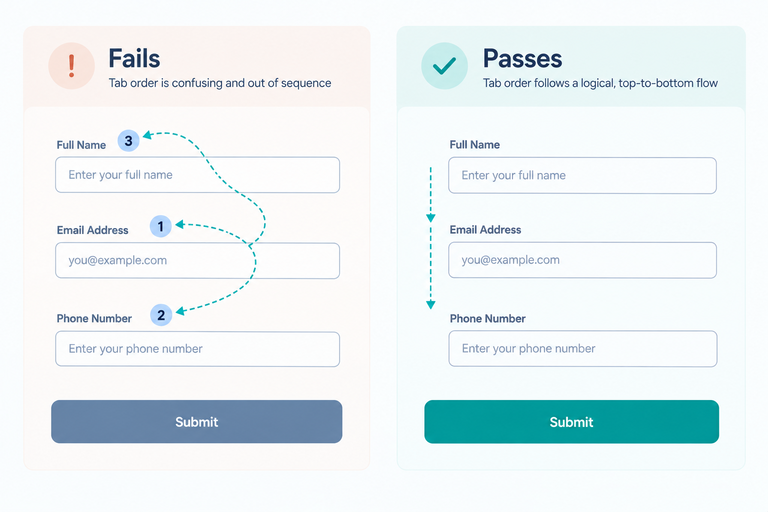
Positive tabindex values. A developer trying to force a specific order sometimes adds explicit numbers: tabindex="1", tabindex="2", and so on. This overrides the natural document order, and it breaks the moment anyone adds a new element later without renumbering everything around it.
<!-- Fails: forced numbering that will drift out of sync -->
<input tabindex="3" name="email">
<input tabindex="1" name="name">
<input tabindex="2" name="phone">

<!-- Passes: no override, natural document order handles it -->
<input name="name">
<input name="phone">
<input name="email">
A visual reorder that doesn't touch the underlying order. CSS properties like order in a flexbox or grid layout can change what a sighted user sees without changing the actual HTML sequence Tab follows. The result: a mouse user and a keyboard user experience two different orders on the same page, and nothing about it looks wrong on screen.
A custom element with no real keyboard support. A <div> styled to look like a button, with a click handler attached, but no tabindex="0" and no keyboard event handling, is completely invisible to Tab navigation. This isn't a confusing order, it's a total block, since a keyboard user can never reach it at all.
A hidden element that's still focusable. A collapsed mobile menu whose links remain technically present in the page, or an element meant to be invisible that still accepts focus, creates a "ghost" tab stop: focus visibly moves, but to nothing a user can see.
What axe-core Catches, and What Only You Can Judge
| Rule | What it checks | Fix path |
|---|---|---|
tabindex |
An element has a positive tabindex value | Auto-fixed always, rewritten to 0 |
aria-hidden-focus |
A hidden element is still individually focusable | Auto-fixed, best-effort, narrow: fixes the element itself, not a hidden container that merely contains a focusable element inside it |
focus-order-semantics |
Whether the actual tab order matches the page's visual and logical order | Manual |
scrollable-region-focusable |
A scrollable region that can't be reached or operated by keyboard | Manual |
The pattern here is consistent with every other fix category worth being honest about. A positive tabindex value is unambiguous, there's no legitimate reason for it, so axe-core rewrites it with full confidence every time it's found. Whether a whole page's tab order actually makes logical sense is a judgment call about what that specific page is trying to communicate, and that needs a person who can look at the page and decide.
What Axeazy Fixes Here
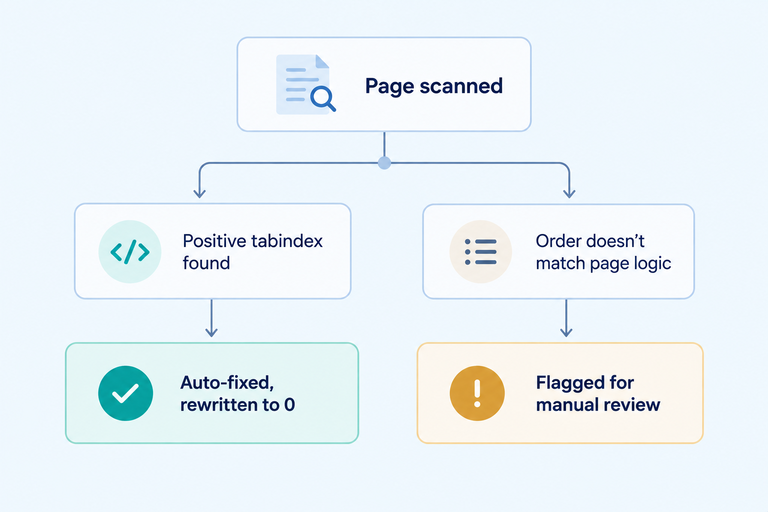
Axeazy auto-fixes positive tabindex values with full confidence, rewriting them to 0 so the browser's natural order takes over. It also auto-fixes the narrower hidden-but-focusable case, an individual element that shouldn't be reachable when hidden. Both are real, working automatic fixes.
Everything about whether an order genuinely makes sense, or whether a custom widget has real keyboard support built in, needs a developer to actually look at the page. That's not a gap Axeazy is hiding, it's the same honest line every fix category in this list eventually draws: a script can rewrite an attribute with confidence, it can't decide what order a page's content should logically read in.
The fix path also depends on your platform. On a React, Next.js, or other GitHub-connected codebase, the tabindex fix reaches you as a real pull request. On Shopify, the scan still finds it, but there's no automatic code change, it becomes a guided checklist item instead. On WordPress, this specific category isn't one of the free plugin's three instant fixes (skip navigation, the language attribute, alt-text fallback), so it currently has no automatic WordPress path either. See the full fix-category breakdown.
FAQ
What's the difference between a broken tab order and a keyboard trap?
Tab order is the sequence focus moves through as someone presses Tab. A keyboard trap is more severe: focus gets stuck on one element, and neither Tab nor Shift+Tab can move it away. A confusing order is a usability problem. A trap is a hard block, and it's its own WCAG requirement, 2.1.2 No Keyboard Trap.
Does adding tabindex="0" fix everything?
It makes an otherwise non-focusable element, like a styled <div> acting as a button, reachable by Tab, and places it in the page's natural document order. It doesn't guarantee that order is logical. Where the element sits in the actual HTML still determines when it gets focus.
Why would a developer ever use a positive tabindex if it causes problems?
Usually a well-intentioned attempt to force a specific order without rearranging the actual HTML. It's often less work in the short term and more work later, since every new element added afterward needs manual renumbering to avoid breaking the sequence again.
Can I test tab order the same way on my phone?
Not really. Tab-key navigation is a hardware-keyboard interaction, so this specific test is built around a desktop browser. Keyboard accessibility on mobile still matters, mainly for people using an external keyboard or a switch-access device with a mobile browser, but it's tested differently.
Does fixing tab order alone make my keyboard navigation fully usable?
No single fix covers everything a keyboard-only user might encounter. Tab order is one real, meaningful piece, a page can still have other issues, like missing focus indicators or a genuine keyboard trap, that need their own separate check.
Sources
Want this in your inbox?
The ADA Alert. Weekly intelligence.
Every Tuesday: accessibility news, common WCAG issues, and code-level fixes. Free. Unsubscribe in one click.
Scope of every report we ship: SCOPE LIMITATION: This report documents violations identified by automated WCAG 2.2 AA scanning using axe-core v4.11.0. Automated tools cannot test every WCAG criterion; many criteria require manual review. This report does not constitute legal advice, guarantee ADA compliance, or protect against legal action. ADA compliance is a legal determination made by courts. For full WCAG conformance assessment, engage an IAAP-certified accessibility professional.