September 14, 2026·14 min read
Iframe Titles: Why Screen Readers Skip Embedded Content
A missing iframe title reads as just "frame" to screen readers. See the WCAG 4.1.2 rule, three real fixes, and a free scan that finds every one.
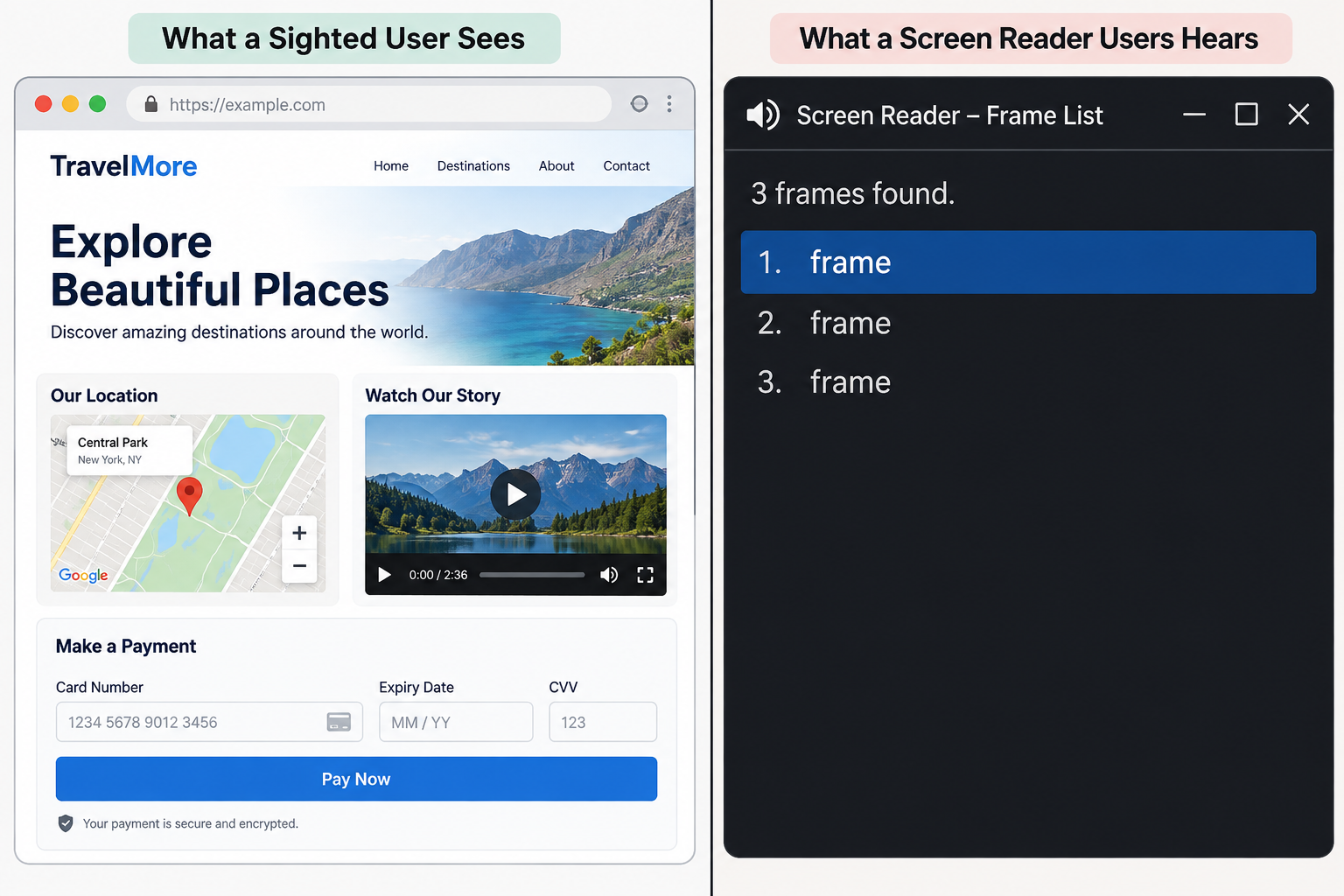
A screen reader reads an iframe without a title as just "frame." It gives no clue if it is a map, a video, or a credit card form. Adding a short, specific title attribute fixes it, satisfies WCAG 4.1.2 (Name, Role, Value), and is one of the fastest, cheapest wins in a full accessibility audit.
Key Takeaways
- An
<iframe>needs atitleattribute so assistive technology can announce what it contains. Without one, screen readers say only "frame," a URL, or a file name. - This is a Level A requirement under WCAG 4.1.2, which means it's a legal minimum in nearly every accessibility law that cites WCAG. It's not just a nice-to-have.
- axe-core (the engine behind Chrome DevTools' accessibility panel) checks this with two rules. One rule checks if a title exists at all. This is the real WCAG requirement. A second, best-practice-only rule checks if titles are unique. Most guides blur these together.
- The three things that fail most often on small business sites are embedded Google Maps widgets. They also include YouTube or Vimeo videos. Another common problem is Stripe or PayPal payment forms. These are often pasted in from a snippet.
- Automated tools can confidently write a title for well-known third-party embeds. They cannot guess a title for a custom or same-origin iframe with confidence. A wrong guess is worse than an honest "needs review" flag.
- Axeazy's free scan uses the same axe-core engine as Chrome DevTools' accessibility panel. It can find every untitled iframe on your homepage in about 60 seconds. No developer is required. No signup is needed.
What the Title Attribute Actually Does
An <iframe> loads a separate document in your page. It can show a map, a video player, a chat widget, or a payment form.
Sighted visitors see the content directly and never think about it. A screen reader user experiences it differently. Their assistive technology needs to announce what that box is before they decide whether to enter it, because entering an iframe changes their whole reading context, similar to opening a new tab.
The title attribute is how you tell them. It becomes the iframe's accessible name. This is the short label a screen reader speaks. It is read when a user tabs into the frame. It is also read when a user opens a list of frames. NVDA and JAWS both let users jump between frames this way.
Leave the attribute off, and the experience degrades in one of a few ways depending on the browser and screen reader combination: some announce a bare "frame," some read out the raw source URL, and some say nothing useful at all. None of those outcomes tell a user whether they're about to watch a video, enter payment details, or land on an ad.
One more wrinkle is worth knowing. Browser support for reaching the iframe by keyboard varies.
Firefox adds a tab stop to an iframe by default. Chrome and Safari usually do not. They only add one if something inside the frame is focusable.
That mismatch across browsers is part of why accessibility specialists have debated for years whether an iframe should always require a name under WCAG 4.1.2, or only when it behaves like an interactive component. The safest and simplest practice is to add a title to every iframe.
Every major testing tool enforces this, no matter the debate. It costs one attribute and it never makes things worse.
The WCAG Rule Behind It (and a Nuance Most Guides Skip)
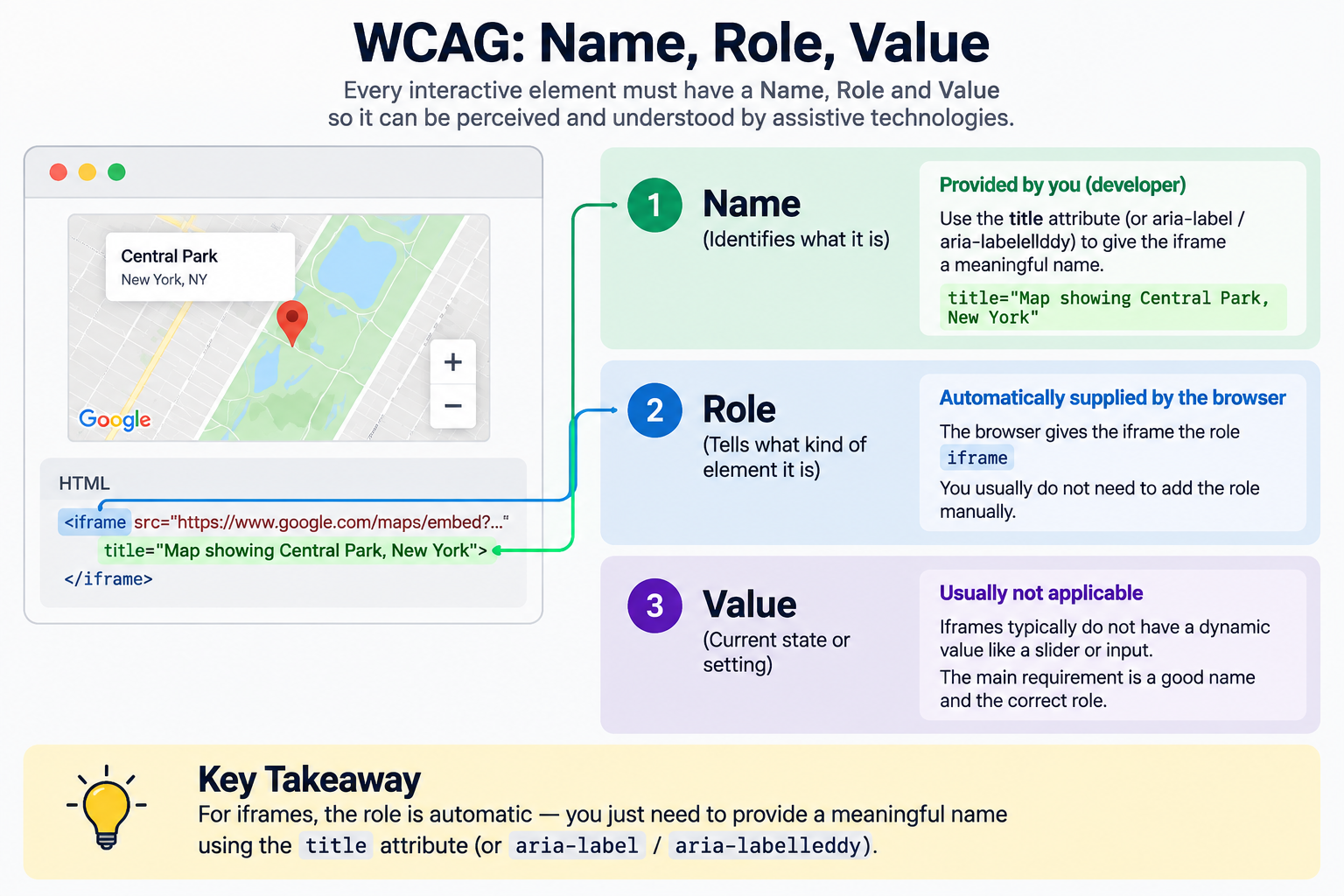
The core requirement lives at WCAG Success Criterion 4.1.2, Name, Role, Value, a Level A criterion. It says every user interface component needs a name that assistive technology can determine.
For an iframe, the browser already exposes the role automatically (it announces as a "frame"). The name is the one part you have to supply yourself, and the title attribute is the standard way to do it.
This isn't a US-only concern either. The same requirement maps to Section 508's 1194.22(i) and the equivalent EN 301 549 provision used across the EU.
Here's the nuance most iframe accessibility guides gloss over. axe-core is the open-source engine behind Chrome DevTools' accessibility panel. It also powers Axeazy's own scanner. It does not check this with a single rule. It runs two:
| Rule | What it checks | Impact rating | Is it a formal WCAG requirement? |
|---|---|---|---|
frame-title |
Does the iframe have a non-empty title at all | Serious | Yes, this is the actual 4.1.2 failure |
frame-title-unique |
Is that title different from every other iframe's title on the page | Serious | No, axe-core tags this as best practice, not a WCAG success criterion on its own |
That distinction matters in practice. A single untitled iframe is a genuine, citable WCAG 4.1.2 failure. Three video iframes that all share the identical title "Video" pass the strict letter of 4.1.2, since each one has a name, but a screen reader user still cannot tell them apart. When using a frame list, this can confuse users trying to jump between embeds.
Fixing the first closes a real conformance gap. Fixing the second is good practice. It makes the page much easier to use. It is worth doing, even though it belongs in a different bucket.
Three Places This Breaks on Real Sites
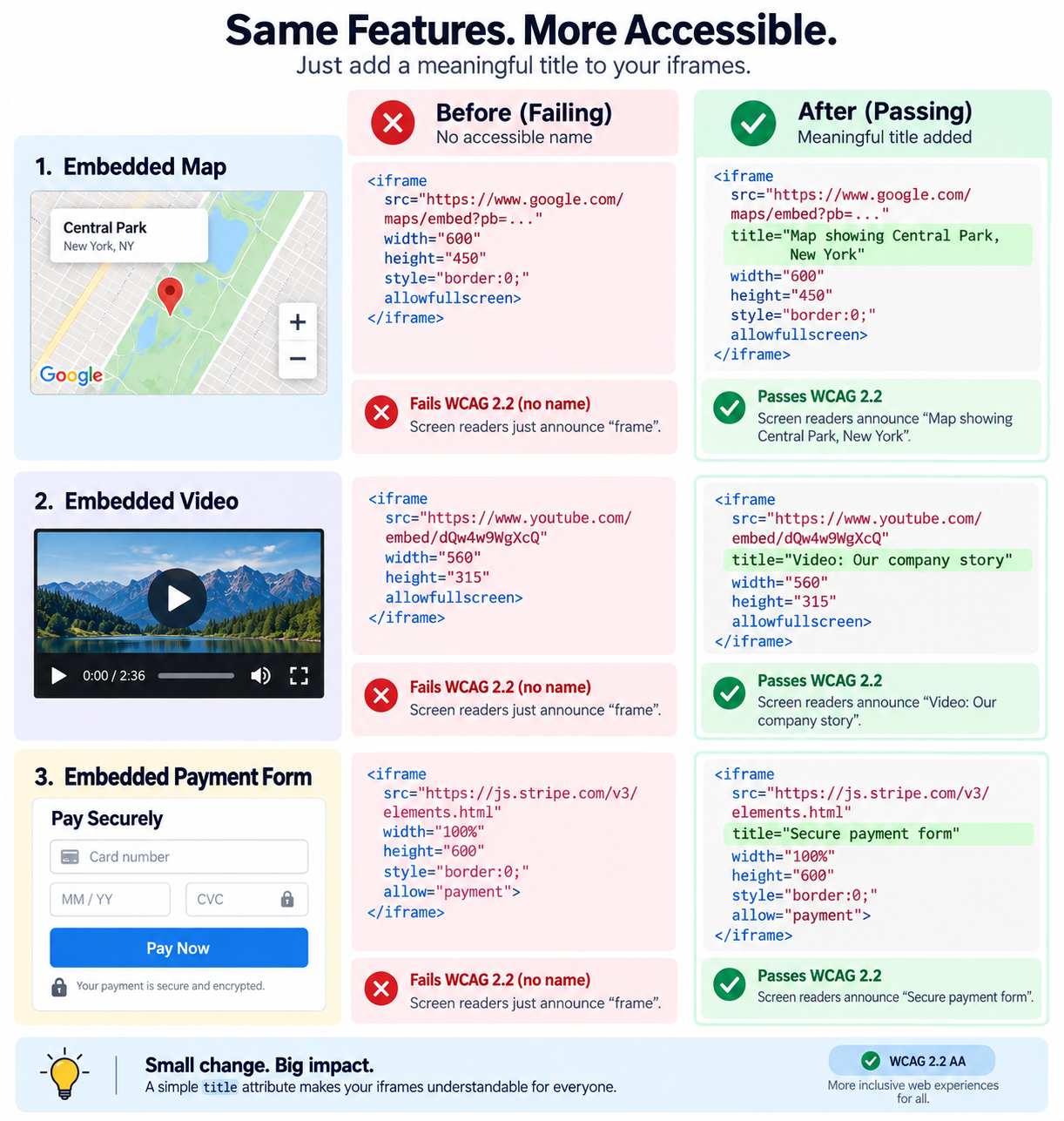
Most iframe title failures aren't exotic. They show up in the same three spots on almost every small business site. People copy and paste these embeds without a second look.
1. An Embedded Map
<!-- Fails: no title, screen reader says only "frame" -->
<iframe src="https://maps.google.com/embed?..."></iframe>

<!-- Passes: describes what's inside and where -->
<iframe
  src="https://maps.google.com/embed?..."
  title="Map showing our storefront location on Main Street">
</iframe>
A restaurant or clinic that embeds a map helps people find the location. This is the kind of page a screen reader user may visit to get directions. An unlabeled map iframe means that information is effectively invisible to them.
2. An Embedded Video
<!-- Fails: generic and copied straight from the embed code -->
<iframe src="https://www.youtube.com/embed/xxxxx" title="YouTube video player"></iframe>

<!-- Passes: describes the actual content -->
<iframe
  src="https://www.youtube.com/embed/xxxxx"
  title="Product walkthrough: setting up your account in 3 minutes">
</iframe>
Neither YouTube nor Vimeo writes a useful title into the embed code they hand you. The default is generic or blank. If you paste an embed code without editing it, you're shipping the failure by default, not by choice.
3. An Embedded Payment Form
<!-- Fails -->
<iframe src="https://js.stripe.com/v3/elements-inner-card"></iframe>

<!-- Passes -->
<iframe
  src="https://js.stripe.com/v3/elements-inner-card"
  title="Secure card payment form">
</iframe>
This one carries the most weight. Payment iframes exist so a merchant's page never handles raw card data. This provides a real security benefit. But a screen reader user who lands on an unlabeled iframe while trying to check out has no way to confirm they're in a legitimate payment field at all, versus stumbling into an ad frame or a tracking pixel. Getting this one right is a trust issue as much as a compliance one.
How to Check Your Own Site in About 60 Seconds
You don't need to hire a developer to check whether this affects you. Two honest paths get you there: run an automatic scan, or check it yourself by hand.
The fastest way is Axeazy's free scan. It runs on the same axe-core engine as Chrome DevTools' accessibility panel. It takes about 60 seconds. It needs no signup or credit card. Point it at your homepage and it flags every missing or empty iframe title on that page, alongside the other 13 fix categories Axeazy checks.
Checking every page on the site, not just the homepage, is included in paid plans. This is because scanning becomes ongoing work, not a one-time check.
If you'd rather check a page yourself right now, here's exactly how:
- Open Chrome DevTools. Right-click any iframe on your page, choose Inspect, and look at the Accessibility pane in the Elements panel. The "Accessible Name" field shows exactly what a screen reader will announce. If it's blank or just says "frame," that iframe fails. This is the same engine and the same underlying check Axeazy's scanner runs, just one iframe at a time instead of a whole page at once.
- Run a one-line check in the console. Paste this into DevTools' console on any page and it will list every iframe missing a usable title:
document.querySelectorAll('iframe') .forEach(f => { const t = f.getAttribute('title'); if (!t || !t.trim()) console.log('No title:', f.src); }); - Spot-check with a screen reader. In NVDA, press
Insert+F7to bring up the elements list and switch it to frames. In VoiceOver, use the rotor (VO+U) and select Frames. Anything listed as blank or "frame" with no description is a failure a real user would hit.
Either path finds the same problem. The manual route is free and works right now for the page in front of you. It just doesn't scale past one page at a time, which is the entire reason a site-wide scan exists.
Writing Titles That Actually Help Someone
A title that only exists to pass an audit isn't doing its job. A few rules keep it useful:
- Describe the purpose, not the vendor. "Customer support chat" tells a user what it does. "Intercom widget" tells them which company you pay, which is useless context for someone deciding whether to open it.
- Be specific. "Video" says nothing. "Product walkthrough: setting up your account" says everything a user needs to decide whether to enter.
- Make every title on a page unique if there's more than one iframe. Three embeds all titled "Tutorial" defeat the entire point of frame navigation.
- Add the title yourself for every third-party embed. Maps, video players, chat widgets, and payment forms almost never come with a useful title baked into the code you're given. Adding one before you publish is on you.
- Keep it short. Somewhere around five to twelve words is the sweet spot. A title that reads like a full sentence is exhausting to hear announced aloud.
- Never use a URL, a filename, or a random ID as the title. A URL or filename is technically a valid string, but it tells the listener nothing useful.
- For a decorative iframe with nothing to announce, hiding it from assistive tech is best. For example, a background tracking pixel has no informational value. Use
aria-hidden="true"instead of making up a title for something not meant to be read. - For a frame you control end to end, some screen readers substitute your
titleattribute with the loaded document's own<title>element instead of using what you wrote. Setting both to the same text avoids that mismatch entirely.
Common Mistakes That Still Fail an Audit
A few patterns keep recurring even on sites that clearly tried:
title="". An empty title is worse than no title at all. It explicitly tells assistive technology "there is no name here" instead of leaving room for any fallback.- The same title copied across multiple iframes. Passes the letter of 4.1.2, fails the point of it.
- Third-party embeds left untouched. The site's own iframes get titled; a pasted-in Calendly or Typeform embed slips through because nobody thought to edit it.
- Hidden iframes left out entirely. Analytics pixels and tracking iframes set to
display: nonestill get flagged by automated scans and, depending on settings, can still be reached by assistive technology. A plain title like "Analytics tracker" satisfies the check and is simply honest about what it is.
What Automated Tools Can (and Cannot) Honestly Fix Here
This is the part most accessibility content leaves out, and it's worth being direct about it.
axe-core will flag every missing or empty iframe title on a scan as a Serious-impact WCAG 4.1.2 failure, the moment it finds one, whether that's Axeazy's scanner, Chrome DevTools, or any other tool built on the same open-source engine. Finding the problem is the easy part.
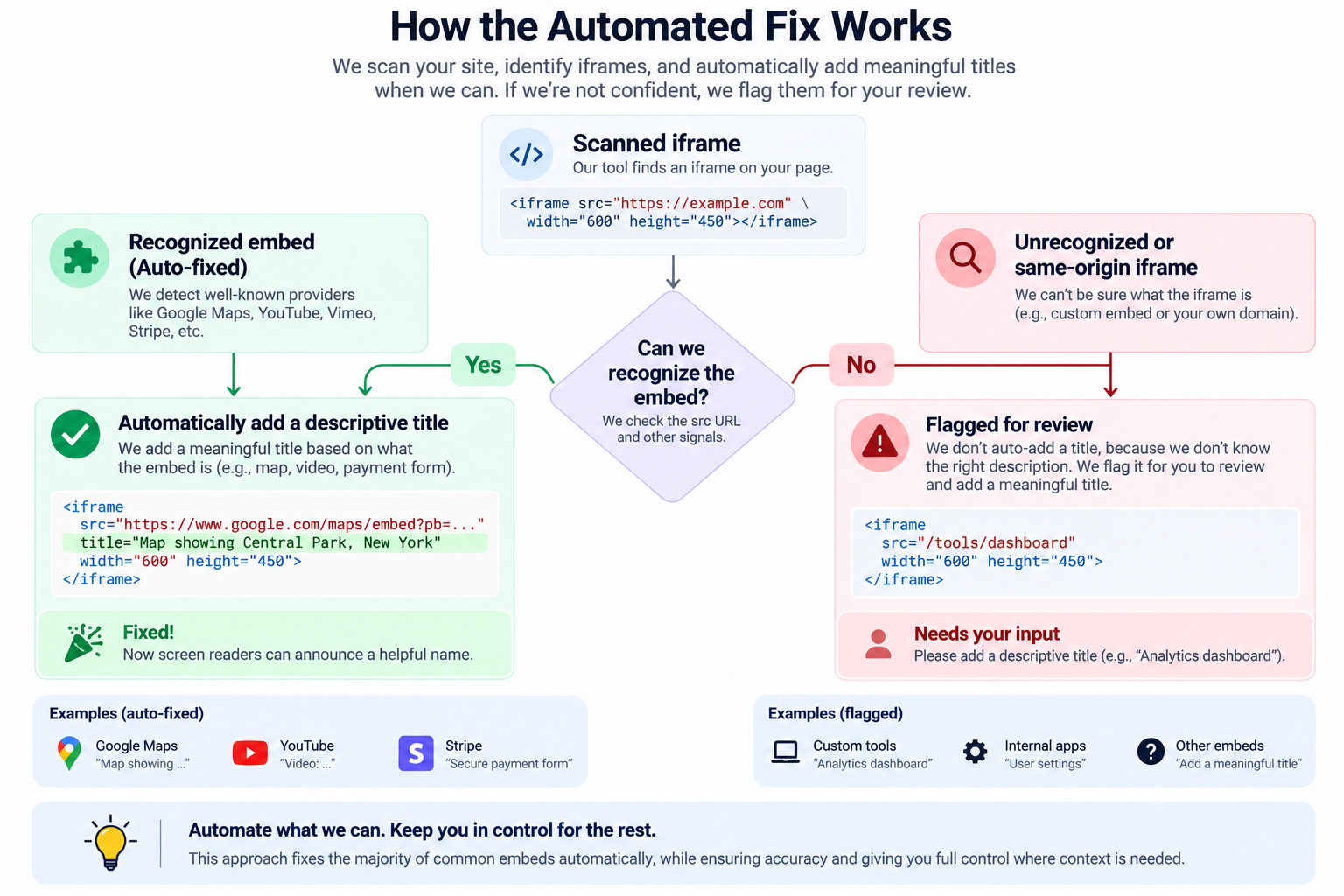
Writing the fix automatically is where the honest limits appear. Axeazy's fix engine recognizes about twenty common third-party embed sources by their web address patterns. These include YouTube, Vimeo, Google Maps, Calendly, Typeform, Stripe, and PayPal. It writes a specific, sensible title for each source it recognizes. That's a real, working automatic fix, not a placeholder.
For anything outside that known list, like a same-origin iframe on your site, it does not guess. The same is true for third-party embeds it does not recognize. It flags the violation and leaves the actual wording to a human.
That's a deliberate choice, not a gap someone forgot about. A wrong title, written with confidence, is worse than an honest "needs review" flag. This is the same logic that makes title="" worse than a missing attribute. Making titles unique across multiple iframes on the same page is still a manual review step. This is because a script cannot safely tell when two embeds are meaningfully different.
How the actual fix reaches your site also depends on your platform:
- A React, Next.js, or custom-code site connected to GitHub gets a real pull request. It includes the exact line change for embed types the engine recognizes. You or your developer review and merge it like any other code change.
- A Shopify store gets the same accurate scan results. The fix is a plain-English step in a guided checklist. It is not an automatic change to your Liquid theme. No automatic pull request exists for Shopify today.
- A WordPress site's free plugin applies three instant fixes at render time. It adds skip navigation, sets the language attribute, and provides fallback text for missing alt text. Iframe titles are not one of those three. On WordPress, this is handled through the checklist. It is not an instant plugin fix yet. See what the WordPress plugin fixes automatically.
None of this is a reason to skip automated scanning. Knowing the difference matters, since it tells you what "fixed" actually means when a tool says so. Iframe titles are a genuinely automatable slice of a much larger standard. Judgment calls about the actual wording, and about keeping titles unique across a page, still need a person. See the full breakdown of what gets auto-fixed vs. what needs review.
FAQ
1. What happens if I just leave an iframe's title blank?
A screen reader announces the frame's role with no name attached, which usually sounds like nothing more than "frame." Depending on the browser and screen reader, the user might instead hear the raw source URL or a filename. Either way, they get no useful information about what's inside before deciding whether to enter it.
2. Can I use aria-label instead of title on an iframe?
Yes. aria-label names the iframe just as effectively and skips the small side effect of title appearing as a hover tooltip for sighted mouse users. If that tooltip adds no value on your page, aria-label is a perfectly reasonable choice. title remains the simplest, most broadly supported default, and if both are present, aria-label takes priority.
3. Do hidden or tracking iframes need a title too?
Yes, for a clean scan and for honesty about what the frame actually does. Automated tools flag display: none iframes the same as visible ones, and depending on settings, assistive technology can still encounter them. A short, accurate title like "Analytics tracker" satisfies the check without pretending it's something else.
4. Do plaintiffs' firms actually cite missing iframe titles in ADA demand letters?
Iframe titles aren't among the handful of categories, alt text, skip navigation, language attributes, form labels, and link or button names, most frequently cited in real demand letters. But it's still a genuine, current WCAG 4.1.2 failure, and a small business site can easily have five or six unlabeled embeds (a map, a video, a booking widget, a payment form) that accumulate into a real problem across a full audit. Worth fixing on its own merits, not just as a legal hedge.
5. Will fixing every iframe title make my site accessible?
No single fix makes a site accessible, and it's worth being suspicious of anything that claims otherwise. Iframe titles address one WCAG 4.1.2 failure among fifty success criteria in WCAG 2.2 AA. This is one solid, real piece of a much bigger picture, not a finish line.
6. Where This Leaves You
Iframe titles are a small piece of code with an outsized effect on whether embedded content is usable at all for someone using a screen reader. The fix is one attribute. The hard part is finding every place it's missing across templates, third-party embeds, and pages nobody's looked at in years, and being honest about which of those a tool can safely fix on its own versus which ones still need a human's judgment.
Axeazy's free scan will surface every untitled iframe on your homepage in under a minute, alongside the other 13 categories it checks and fixes at the code level. Every fix, this one included, gets logged into a dated, timestamped record you can point to later, a record of real effort, not a compliance badge.
Sources
Want this in your inbox?
The ADA Alert. Weekly intelligence.
Every Tuesday: accessibility news, common WCAG issues, and code-level fixes. Free. Unsubscribe in one click.
Scope of every report we ship: SCOPE LIMITATION: This report documents violations identified by automated WCAG 2.2 AA scanning using axe-core v4.11.0. Automated tools cannot test every WCAG criterion; many criteria require manual review. This report does not constitute legal advice, guarantee ADA compliance, or protect against legal action. ADA compliance is a legal determination made by courts. For full WCAG conformance assessment, engage an IAAP-certified accessibility professional.